Documentation ›
Avion Multi-Factor Authentication Flows ›
Set default authentication method
Login Preferences
The Login Preferences section in your Account settings allows you to manage how you authenticate when signing in to your account.
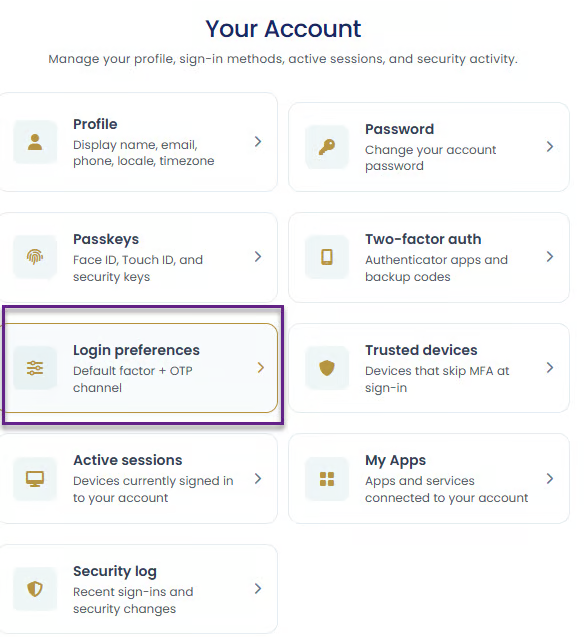
From this section, you can:
choose your preferred default secondary authentication method
and enable or disable passwordless sign-in.
These settings help you customize the security and convenience of your login.
Selecting a Default Secondary Authentication Method
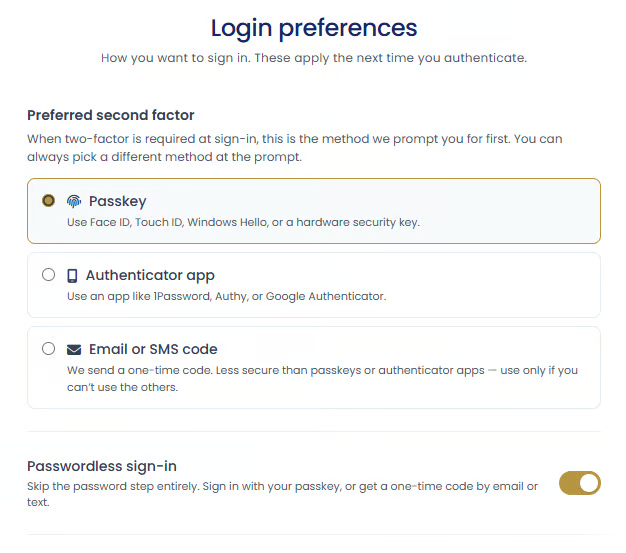
If you have multiple two-factor authentication methods configured, you can choose which method should be used by default during sign-in.
The available options depend on which authentication methods you have already set up on your account.
For example, if you have configured:
a passkey,
and an authenticator app,
you will be able to choose between:
passkey authentication,
authenticator app verification,
or Email/SMS one-time passcode (OTP).
Default Fallback Authentication Method
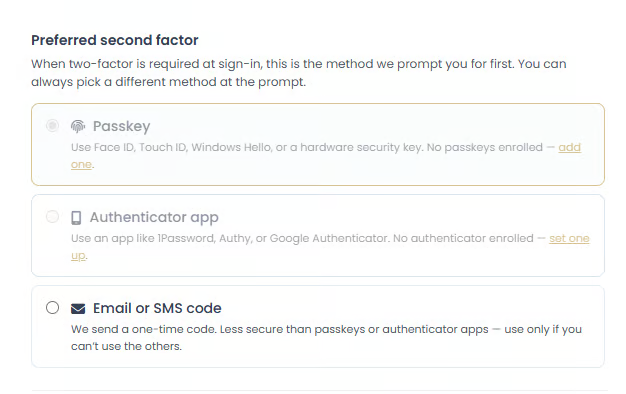
If passkey or authenticator app authentication has not been configured, the default secondary authentication method will fall back to "Email or SMS one-time passcode (OTP)".
This ensures that you can still securely verify your identity during login even if more advanced authentication methods are not yet set up.
Changing Your Preferred Authentication Method
You can update your preferred secondary authentication method at any time from the Login Preferences settings.
Changing your preference only affects the default method presented during sign-in.
Other configured authentication methods will still be available as alternative options when logging in.
Passwordless Sign-In
The Login Preferences section also includes the option to enable or disable passwordless sign-in.
When passwordless sign-in is enabled, you may be able to sign in without entering your password by using:
a passkey
This can provide:
faster login,
improved convenience,
and reduced reliance on traditional passwords.