Documentation ›
Avion Service Desk ›
Request Lifecycle
Process flow
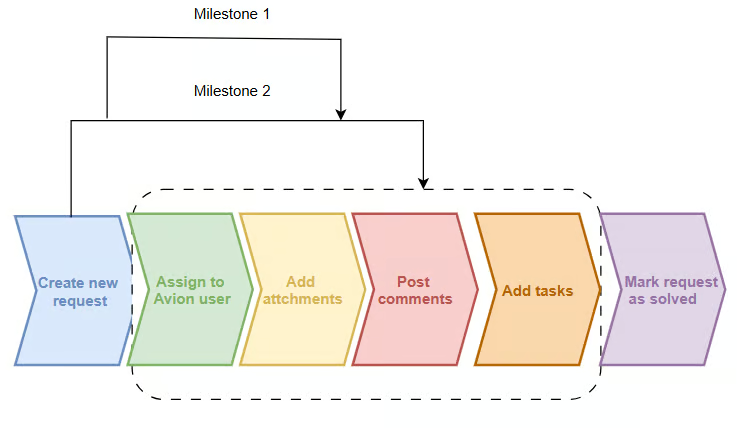
The lifecycle of a service request begins when a user submits a new ticket through the system.
Once submitted, the request is assigned to a member of the Avion team, who is responsible for investigating the issue and working toward a resolution.
To aid in this process, users are encouraged to include relevant attachments—such as screenshots, documents, or logs—which can assist with the investigation, design, and planning stages.
Users can define the different stages (Milestones) that can be used to set deadlines for each stage, ensuring that tickets are resolved within a reasonable timeframe.
Throughout the lifecycle of the ticket, both the Avion team and the requesting user can communicate and collaborate by adding comments or more information.
This ensures transparency and helps clarify any details or updates related to the request.
Tasks can also be added to a service desk request and assigned to users that are part of the organisation and project lane.
Once a resolution has been reached and the issue is deemed satisfactorily addressed, the ticket should be formally closed by clicking the "Mark as Solved" button.
This action signifies the successful completion of the service request.