TOTP Users (Authenticator)
Users configured with an Authenticator App (TOTP) in addition to Email OTP.
TOTP is preferred; OTP is a fallback.
Options
[Non-Trusted Device]
Non-Trusted Device
Log in with username/password.
User is prompted to enter OTP code from Authenticator app (TOTP).
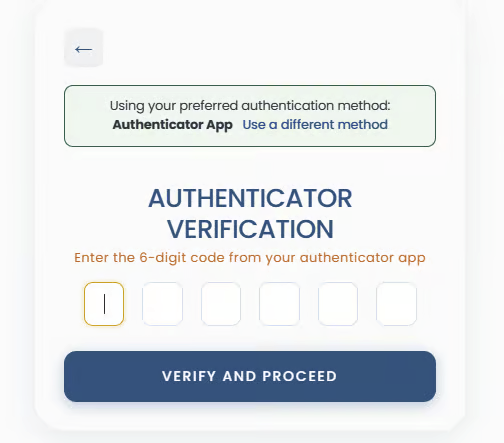
OTP fallback options are available (via the "Use a different method" link).
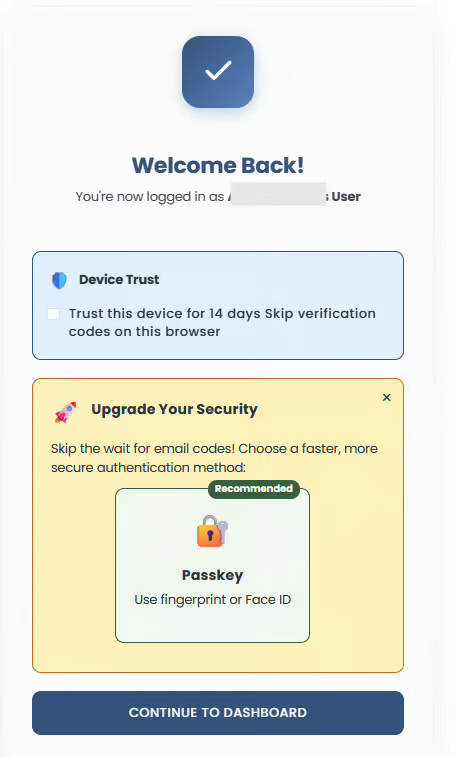
Upon successful TOTP entry, the option to extend the trust days is displayed.
An option to upgrade security is also presented.
[Trusted Device]
Trusted Device
Log in from a trusted device.
MFA skipped completely.
On the splash screen, the user is offered to extend the device trust for a further 14 days.
The option to upgrade security with a passkey (if not set up yet) is also shown to the user.
[Expired Trust]
Expired Trust
After trust expiry, the user must re-verify with TOTP.
Trust option re-shown after verification.