Forgot Password / Reset Password
How the Forgot Password Process Works
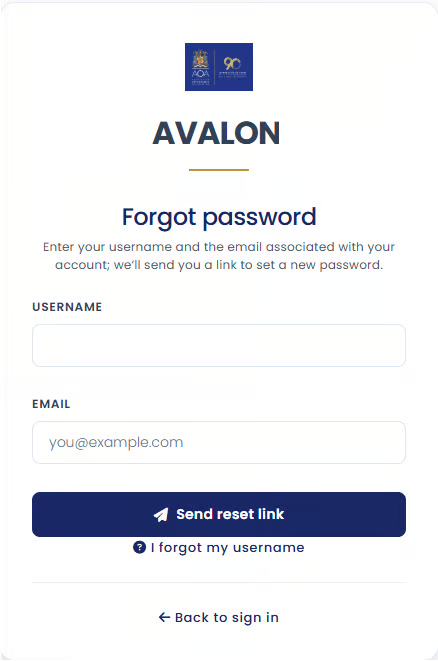
Step 1. Enter Your Account Details
your username,
and your email address associated with the account.
Step 2. Account Verification
is unique,
can only be used for password reset,
and will expire after 60 minutes.
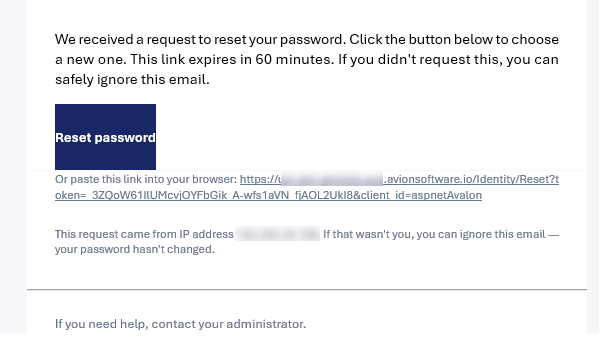
Step 3. Open the Reset Link
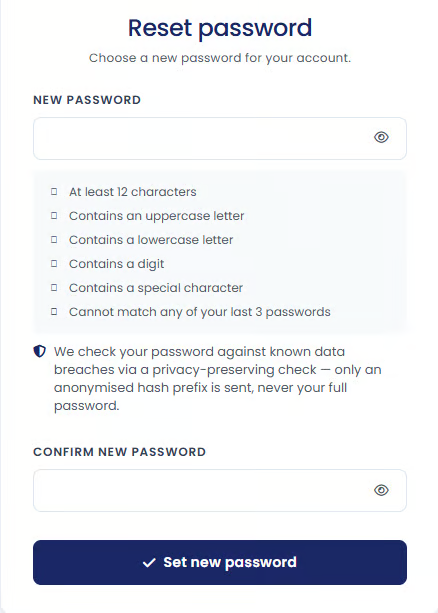
New Password Requirements
Be at least 12 characters long
Contain at least one uppercase letter
Contain at least one lowercase letter
Contain at least one number
Contain at least one special character
Not match any of your last 3 passwords
Password Security Checks
only an anonymized portion of a password hash is checked,
your full password is never sent,
and the original password cannot be reconstructed from the information shared.
After Resetting Your Password
you can sign in using your new password,
and you will be asked to complete additional verification steps when signing in again such as passcode, authenticator code or email OTP.
ignore the email,
avoid clicking the reset link,
and contact support if you are concerned about unauthorized activity.