Documentation ›
Avion Multi-Factor Authentication Flows ›
Login Workflow
Login Flow
Users can sign in to the system either from the Website or from the Avalon application. When a user selects the login option, they are redirected to a secure external login page that is configured specifically for the customer organization.
Step 1. Enter Username and Password
On the first login screen, the user enters:
their username,
and password.
The user then selects to sign in:
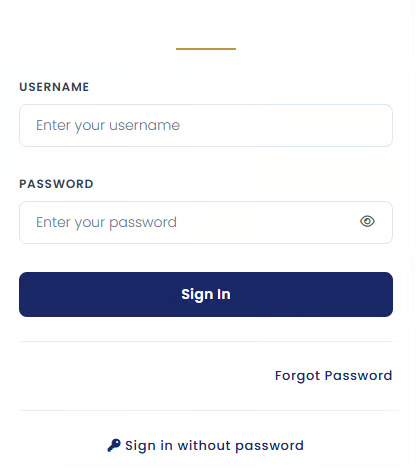
If the username and password are valid, the user proceeds to the secondary authentication step.
Step 2. Secondary Authentication
The second screen prompts the user to complete their configured secondary authentication method.
Initially, the screen displays only the user’s default authentication option based on their Login Preferences settings.
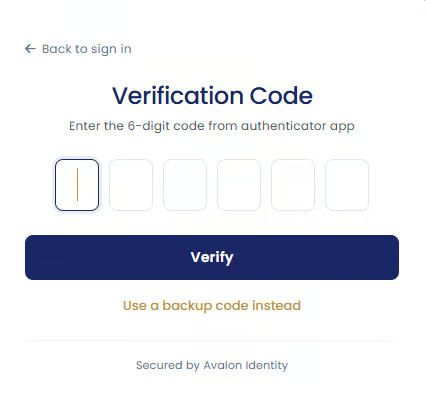
Depending on the user’s configuration, the default method may be:
passkey authentication,
authenticator app verification,
or Email/SMS one-time passcode (OTP).
Using Alternative Authentication Methods
Underneath the default authentication option, the user can select to Use a backup option instead.
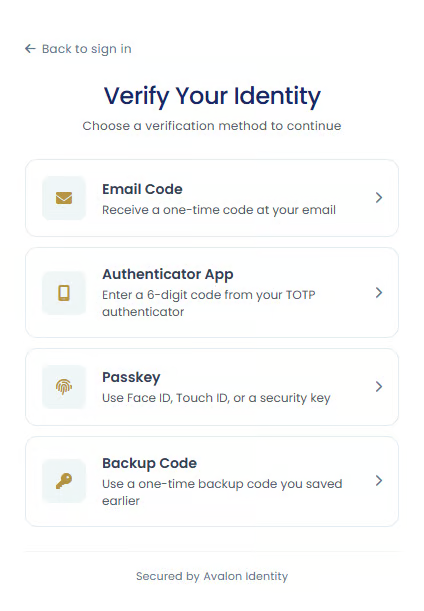
This allows the user to choose from other available authentication methods configured on their account. Available options may include:
Email Code
A one-time verification code is sent to the user’s registered email address. The user enters the code to continue signing in.
Authenticator App
The user opens their authenticator app and enters the temporary verification code currently displayed in the app.
Supported apps include:
Google Authenticator
Microsoft Authenticator
Passkey
The user authenticates using a passkey stored on their device.
Depending on the device, this may involve:
fingerprint recognition,
face recognition,
or entering a device PIN.
Backup Code
The user can enter one of their backup recovery codes.
Backup codes are provided when an authenticator app is first configured and can be used if the user cannot access their normal authentication methods.
Forgotten Password Option
The login page also provides a forgot password option:
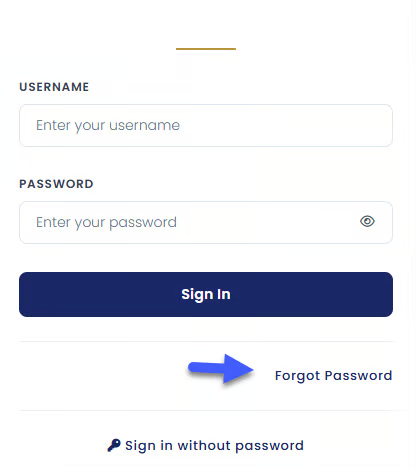
This allows users who cannot remember their password to begin the password reset process and securely regain access to their account.
Successful Login
Once authentication is successfully completed, the user is signed in and redirected back to the Website or Avalon application they originally attempted to access.
If the user has permission to access multiple applications, they may also be able to move between authorized applications without needing to sign in again.